

How to Bid and Buy
St. Louis Online Auctions are fun! And we aim to make the process for our buyers as energized and efficient as possible. Here is how you can get started bidding on our expansive inventories.
- Download the GRS App from the Apple or Google stores online. Or peruse and bid straight from this website.
- Navigate to the auction or lot you wish to bid on, and click on the “Sign In” button.
- From here, you can click on the “Sign Up” link to create a new bidding account. This is also where you can reset your password and sign in (if you have an existing account) to view the auction.
- Follow the instructions by entering your first and last name, a valid email address, and a password at least 8 characters long.
- Accept the terms of use.
- You can now register for a specific auction. To do this, click on "Register to bid."
- Enter in your contact information and click submit.
- You may be prompted to enter your credit card information in a specific auction. This is only to verify available funds and will not charge your credit card.
GRS Auctions Missouri online auctions are fast, efficient and effective. Get your high bid in now and win from GRS local online auctions.
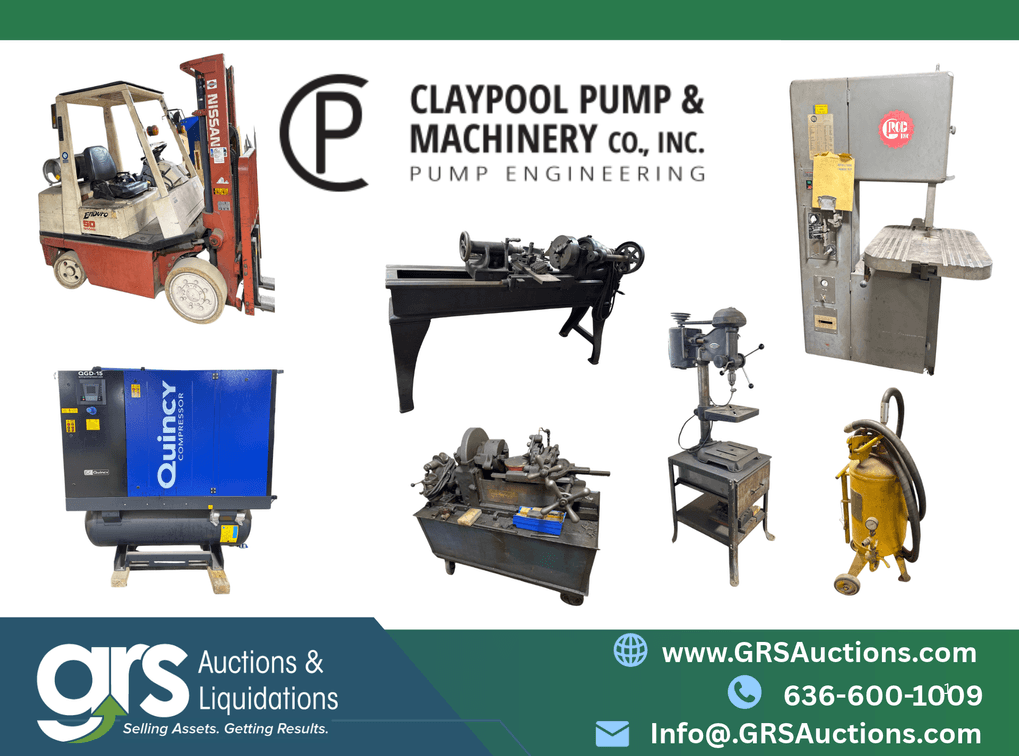
Machine Shops and Pump Equipment
Claypool Pump & Machinery: St. Louis Machine Shop & Pump Equipment Auction
- Oct 30 @ 4:00pm CDT (Start)
- Nov 10 @ 7:00pm CST (End)
- Add to Calendar
- Nov. 9 @ 3:00PM CST (Start)
- Nov. 9 @ 5:30PM CST (End)
- Nov. 12 @ 9:00AM CST (Start)
- Nov. 12 @ 4:00PM CST (End)
After nearly 80 years serving the St. Louis region, Claypool Pump & Machinery has relocated and sold its building, and the contents of its pump repair and machine shop are now up for bid online through GRS Appraisal & Auction Services. This St. Louis machine shop auction offers more than 200 lots of metalworking and industrial equipment, including a Monarch engine lathe, a Hamilton belt-driven lathe, Kalamazoo and Grob band saws, drill presses, a Beaver pipe threading machine, Quincy and Ingersoll-Rand air compressors, and a Lincoln Electric Idealarc 300 welder. Machinists, machine shops, fabricators, and home workshops will find working shop equipment alongside steel stock, tooling, and shop supplies. Begins Closing: Tuesday, Nov 10 @ 7:00pm CST Preview Dates: Monday, Nov. 9 @ 3:00PM - 5:30PM CST Pickup Dates: Thursday, Nov. 12 @ 9:00AM - 4:00PM CST Location: 2615 S 10th St, St. Louis, MO 63118, US *** tax exempt auction ***
Enter Auction »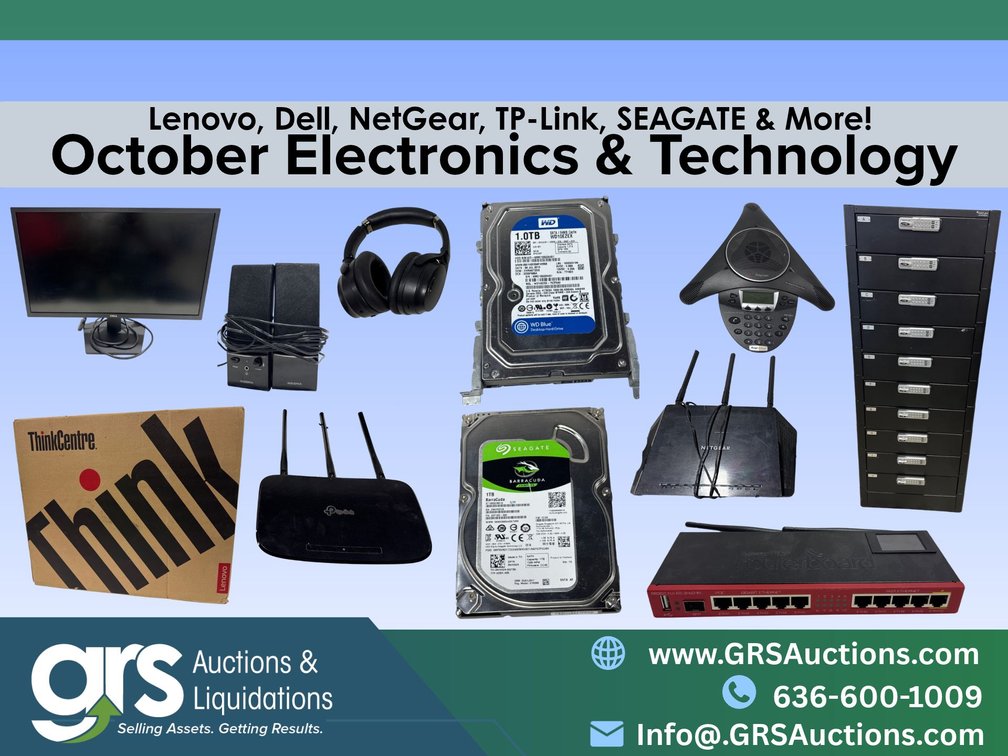
Technology & Electronics!
Electronics Last Chance Technology - Surplus Clearance Sale!
- Oct 13 @ 4:30pm CDT (Start)
- Nov 11 @ 7:00pm CST (End)
- Add to Calendar
- Nov. 10 @ 9:00AM CST (Start)
- Nov. 10 @ 4:30PM CST (End)
- Nov. 13 @ 9:00AM CST (Start)
- Nov. 13 @ 4:30PM CST (End)
The Electronics Last Chance Technology Surplus Clearance Sale from GRS Auctions & Liquidations is a St. Louis Online Auction featuring business computers, monitors, docking stations, networking gear, and conference phones from Lenovo, Dell, Aruba, Ruckus, Cradlepoint, Polycom, Hikvision, and Minuteman. Year-end is coming fast, so is your IT budget going toward retail prices or toward more equipment for the same money? IT departments, managed service providers, computer repair shops, refurbishers, schools, and small offices upgrading on a budget can bid on Lenovo ThinkCentre M90a All-in-One PCs with Intel Core i5-10500 processors, 8GB RAM, and 256GB SSDs, Dell SE2422H flat panel monitors, Dell D6000 universal docking stations, Lenovo ThinkPad Thunderbolt 3 Dock Gen 2 docking stations, and a Minuteman Entrust ETR1000LCD 1000VA/600W UPS. The Electronics Last Chance Technology Commercial Inventory Reduction puts business-grade computer hardware and office technology up for auction below retail and reseller pricing, so you set the price. Searching for a computer auction near me or an IT equipment auction in St. Louis? Bid online at GRSBidNow.com | GRS Auctions & Liquidations | Licensed Auctioneers in Missouri and Illinois | Contact: 636-600-1009 / info@grsauctions.com | Tap! Bid! Win! Begins Closing: Wednesday, Nov. 11 @ 7:00pm CDT Preview Dates: Tuesday, Nov. 10 @ 9:00am - 4:30pm CDT Pickup Dates: Friday, Nov. 13 @ 9:00am - 4:30pm CDT Location: 11428 Moog Drive, Maryland Heights, MO 63146
Enter Auction »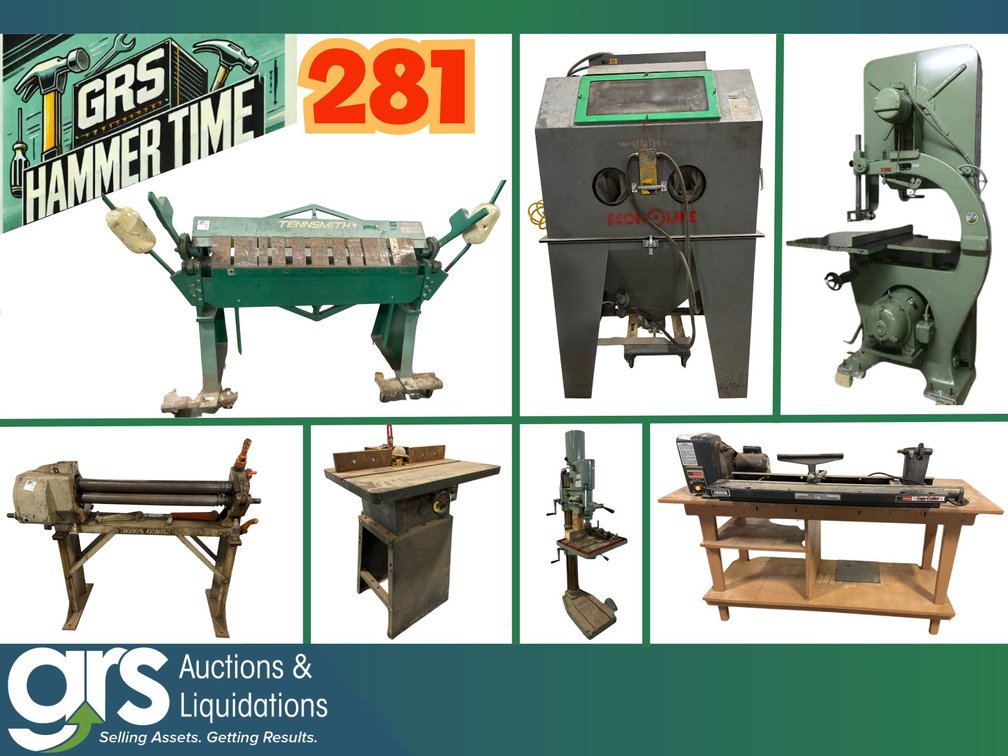
Industrial Machinery & Equipment!
Hammer Time #281 Industrial Machine Shop - Metalworking, Fabrication & Woodworking Equipment!
- Oct 28 @ 4:30pm CDT (Start)
- Nov 16 @ 7:00pm CST (End)
- Add to Calendar
- Nov. 13 @ 9:00AM CST (Start)
- Nov. 13 @ 4:30PM CST (End)
- Nov. 18 @ 9:00AM CST (Start)
- Nov. 18 @ 4:30PM CST (End)
Hammer Time Machine Shop - Metalworking, Fabrication & Woodworking Surplus Equipment Clearance The Hammer Time Machine Shop Liquidation auction from GRS Auctions & Liquidations is a St. Louis Online Auction featuring sheet metal fabrication equipment, metalworking machinery, welders, and precision measuring tools from Tennsmith, Wysong & Miles, Grob, Feeler, Lincoln Electric, Baldor, Mitutoyo, and Starrett. Cold weather moves the work inside, so is your shop tooled up for winter projects and new year production? Metalworkers, fabricators, HVAC sheet metal shops, machinists, mechanics, maintenance technicians, manufacturers, plant managers, and makerspaces can bid on a Tennsmith HBU48 box and pan sheet metal brake, a Tennsmith HB97 16 gauge sheet metal hand brake, a Wysong & Miles 336-HR 36" slip roll on stand, an NH 7225 sheet metal shear, a Grob NS24 vertical band saw with blade welder, a Feeler S-24B geared head floor drill press with vise and foot switch, a Lincoln Electric Lincwelder AC-225-S AC arc welder, and a Baldor 8123WD 3/4 HP three-phase dual-wheel pedestal grinder. The Hammer Time Machine Shop Asset Sale puts industrial shop equipment up for auction well below new and dealer pricing, so you set the price. Searching for a machine shop auction near me or metalworking equipment for sale in St. Louis? Bid online at GRSBidNow.com | GRS Auctions & Liquidations | Licensed Auctioneers in Missouri and Illinois | Contact: 636-600-1009 / info@grsauctions.com | Tap! Bid! Win! Begins Closing: Monday, Nov 16 @ 7:00pm CST Preview Dates: Friday, Nov. 13 @ 9:00AM - 4:30PM CST Pickup Dates: Wednesday, Nov. 18 @ 9:00AM - 4:30PM CST Location: 11428 Moog Dr Maryland Heights, MO 63146, US
Enter Auction »
Sneak Peak
Live the Legacy: Patty Bush Doc’s Harley-Davidson Private Collection
- Oct 28 @ 3:00pm CDT (Start)
- Nov 18 @ 1:00pm CST (End)
- Add to Calendar
- Nov. 16 @ 3:00PM CST (Start)
- Nov. 16 @ 6:00PM CST (End)
- Nov. 20 @ 9:00AM CST (Start)
- Nov. 20 @ 4:00PM CST (End)
For decades, Doc’s Harley-Davidson in Kirkwood, Missouri, was more than a dealership. Ralph “Doc” Schneidewind opened the doors in 1955 and backed flat track racing from the start. His daughter, Patty Bush, carried that legacy forward as the dealership’s longtime owner. Patty created a unique community atmosphere in the dealership and lived the legacy with her valued friends, customers, and celebrities, while also supporting artists, and Harley-Davidson racing teams. Along the way, she built a private collection that tells the story of American motorcycling from inside the showroom: gifts from the artists, autographs from the riders, and pieces set aside because they meant something. Follow the GRS Facebook, YouTube, and LinkedIn pages for engaging stories about these pieces of Harley Davidson History.
Enter Auction »
Bid NOW on Bid Spotter
Distribution Center - Lubricant Products, Material Management, Racking & Signage
- Oct 24 @ 12:00pm CDT (Start)
- Nov 23 @ 1:00pm CST (End)
- Add to Calendar
- Nov. 13 @ 2:00PM CST (Start)
- Nov. 13 @ 6:00PM CST (End)
- Nov. 30 @ 9:00AM CST (Start)
- Nov. 30 @ 4:00PM CST (End)
Chart Distribution has closed its lubricant distribution center in Lincoln, Illinois, and GRS Auctions & Liquidations is selling the contents online. This central Illinois equipment auction features dozens of empty bulk oil dispensing tanks, lube cube bench tanks, and mobile oil carts with Graco, Lincoln, and Reelcraft hose reels and metered nozzles. It also offers a large selection of 275- and 330-gallon IBC totes and stackable steel bulk storage tanks. Mechanics, quick lube shops, fleet operators, oil distributors, and farmers can add fluid storage and dispensing capacity at auction prices. Air-operated oil pumps, transfer pump carts, camlock hoses, and retractable hose reels make it easy to set up a working lube room or farm fuel station. Closing: Monday, November 23, 2026 1:00 PM CST Preview: Friday, November 13, 2026 2:00PM to 6:00PM CST Pickup Dates: Monday, November 30, 2026 9:00AM to 4:00PM CST Location: 1304 Woodlawn Road, Lincoln, IL 62656
Enter Auction »
Restaurant & Dining Equipment!
Waiting for the curtain to raise on a very special restaurant and bar online auction!
- Nov 2 @ 4:30pm CST (Start)
- Nov 30 @ 7:00pm CST (End)
- Add to Calendar
Begins Closing: TBA Preview Dates: TBA Pickup Dates: TBA Location: TBA *** tax exempt ***
Enter Auction »Mobile Bidding

Can't make it to the auction?
Bid on our auctions from your smartphone Just Tap! Bid! Win! and never miss a deal. Download our app today from the Apple App Store or Google Play.